Design your way,
with AI you already use.
- Claude Desktop
- Claude Web
- Codex
- CursorComing soon
- ZedComing soon
- WindsurfComing soon
- VS CodeComing soon
dirhp organizes Rhino designs so AI assistants like Claude and ChatGPT knows what objects in your models are, not just their shapes.
Animated demo. A separate AI assistant, connected to the Rhino model by dirhp, reads the model and makes changes to it. It reads the building and tints each object by what it is: structure, cladding, frames, glass and roof. It is then asked to label all the glass, and fills in thickness, type, supplier and product on every glass object at once, replying that it labelled them. Finally it is asked to bring back an earlier design option, and the model switches to that version.
To your AI, every object is a shape.
Designers keep the meaning by hand.
The model holds geometry. Meaning sits in attributes, layer names, and in the designer's head.
Layers are renamed to find things again. Quantities are counted by eye. Checks are repeated because nothing records that they were done.
Each change starts it over. The layer list is the record.
Layers
8 of 16 layers
Hover or tap ? to see what a name doesn't tell you.
Your assistant has to guess.
A typical CAD file holds surfaces, curves and solids. It does not hold facts about objects.
An assistant asked to change them has to go looking. Read the layers. Pull the objects. Get their metadata. Sort through them. Guess. Repeat.
Unreliable on real models.
Hover any object. Type and attributes are everything the file knows about it.
Your AI assistant, with dirhp
How dirhp works
Meaning
Dirhp attaches meaning to objects as you design with your assistant.
This is what lets an assistant find the right things in a sea of objects.
Intent
A design approach is remembered, not tied to the geometry it happened to produce.
Design assistants can apply it on another project without you having to describe it again.
History
What happened, and when. The model keeps snapshots of itself.
A question about a previous design version has an answer that doesn't just depend on memory.
dirhp is the design context between tools.
It holds what things are, and it keeps that knowledge as the design changes.
 Grasshopper
 Rhino
Rhino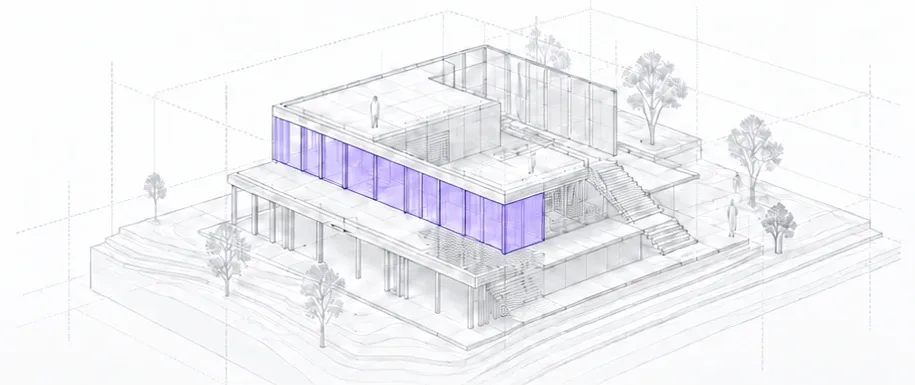
Design context
- MeaningWhat things are and why they exist.
- DecisionsDesign intent and trade-offs.
- HistoryHow the model evolved over time.
WORKS WITH MULTIPLE ASSISTANTS
dirhp speaks MCP, an open standard, so it is not tied to one assistant.
Tested
- Claude Desktop
- Claude Code
- ChatGPT
- Codex
Should work, not yet tested
- Cursor
- VS Code / Copilot
- Windsurf
- Zed
- Cline
- Continue
- Other MCP clients
Scripts are part of design history too.
Dirhp lets you go back to any point in your design history to get the script and parameters behind it.
Dirhp is definitely for you if...
- —You model in Rhino.
- —You already use an AI assistant most days.
- —You are willing to use early software on a real project and say what breaks.
The tools that dirhp provides your assistants run on dirhp's servers.
If you are not sure if your work is under terms that restrict third-party processing, talk to us before you install.
You want drawings, sheets or schedules out of it. That is not part of dirhp today.
How to get it
dirhp needs two pieces to work: the agent plugin in your AI assistant and the Rhino plugin in Rhino. Install both.
Agent plugin
Start a new session or thread after installing.
dirhp-architecture needs the base dirhp plugin for its connection.
Rhino plugin
01
Open Rhino and drag the .yak file into the Rhino window to install.
02
Restart Rhino, then run the dirhp_Panel command to check it is installed.
Questions
Free early access
Model in Rhino with the AI you already use. Leave your email and we will send the plugin and setup instructions.